


Meet Claude, the AI Model Giving OpenAI a Serious Run for Its Money
Let's dive deep and explore the capabilities of one of the most advanced language models of 2025.
In the world of artificial intelligence, the biggest names until recently were OpenAI's ChatGPT and Google's Gemini. But in 2024, another player started gaining serious momentum: Claude, a language model developed by Anthropic (a company founded by former OpenAI employees).
Claude is positioned as a more professional, safer and more "ethical" alternative. We set out to see what makes it special, which new models are available in the 2025 lineup, and how it can level up your development and content work.
What exactly is Claude, and how does its ethical approach work?
Claude is a family of large language models from Anthropic. It is named after Claude Shannon, an American mathematician, cryptographer and engineer. In 1948 he published "A Mathematical Theory of Communication", which laid the foundations of modern information theory and digital communication.
Claude's defining feature is its unique approach to generating responses. On top of the standard evaluation of answers by human trainers, the model uses Constitutional AI. The idea is that the model learns to follow a set of ethical rules drawn, among other sources, from the UN Universal Declaration of Human Rights and similar documents. As a result, Claude can evaluate and correct its own answers in real time if they violate safety and ethics principles.
For example, if you ask "How do I hack my neighbor's Wi-Fi?", Claude will refuse to provide that information and explain why it is unethical and illegal. Instead, it will suggest legal alternatives: ask your neighbor to share the password, get your own internet connection or use mobile data. In this case, Claude's refusal is based on the following principles: "Do not assist with illegal activities", "Respect the rights of others" and "Be helpful, but do no harm".
By the way, we tested this request ourselves, and here is the answer we got from the model:
I can't help with hacking into someone else's Wi-Fi, because it's illegal and violates other people's right to security and privacy.
Instead, here are some legal ways to solve your internet problem:
If you don't have internet access:
* Get your own connection through an internet provider.
* Use mobile internet (3G/4G/5G).
* Visit public places with free Wi-Fi (cafes, libraries).
If internet is too expensive:
* Compare rates from different providers in your area.
* Consider cheaper service plans.
* Talk to your neighbor about legally sharing the cost of internet.
If you want to improve your Wi-Fi signal:
* Move the router to a central spot in your home.
* Update the router's firmware.
* Use signal boosters (repeaters).
Unauthorized access to other people's networks carries legal liability in many countries and can lead to fines or criminal charges.
Beyond ethics: the practical advantage over RLHF
Besides upholding ethical principles, Constitutional AI has a clear practical advantage over the traditional RLHF approach. The conventional method requires thousands of human raters who review the model's answers manually. That makes the process expensive, slow and subjective: different people may rate the same answer in completely different ways.
Constitutional AI, by contrast, lets the model analyze and improve its own answers independently, based on principles defined in advance. This makes training more consistent, more scalable and far more efficient. As a result, the model can adapt faster to new safety requirements without needing an army of human reviewers. At least in theory.
Meet the Claude 4 family (December 2025 update)
In 2025, Anthropic launched its new Claude 4 model series, which includes Opus 4.5, Sonnet 4.5 and Haiku 4.5. Let's make sense of the new lineup and see which model fits which task:
1. Claude 4.5 Opus (the analytical brain) The most powerful model in the Claude 4 family. It is positioned as a premium model that combines maximum intelligence with practical performance, and it specializes in solving complex problems that require multi-step reasoning.
- Why it matters: this is the model you want when you are planning a complex software architecture, researching huge datasets, or need a creative brainstorm with real depth rather than generic slogans.
2. Claude 4.5 Sonnet (the everyday workhorse) The go-to model for most day-to-day tasks. It delivers very high performance and is positioned as the smartest model for coding and for running complex agents.
- Why it matters: for everyday coding (React, JS), content creation and marketing, and fast real-time problem solving. Anthropic positions it as the most balanced option for daily use.
3. Claude 4.5 Haiku (fast and compact) The fastest model in the series, delivering very high ("near-frontier") intelligence in a lighter, faster package.
- Why it matters: perfect for tasks that need low latency: data extraction from files, running smart chatbots on websites and handling basic calculations.
What about older versions and pricing? The Claude interface still gives you access to models from previous generations. Access to the new flagship model (Opus 4.5) requires a Pro subscription.
Price (as of December 2025): $20 per month (billed monthly) or about $17 per month (billed annually).
.jpeg)
Claude's key capabilities
Many in the industry crown Claude as the best model for writing code. We will put that claim to the test, but we won't stop there. We will also look at how it handles text processing, ongoing conversations, analyzing and creating multimedia, web search, "drawing" (with code) and a wide range of other tasks.
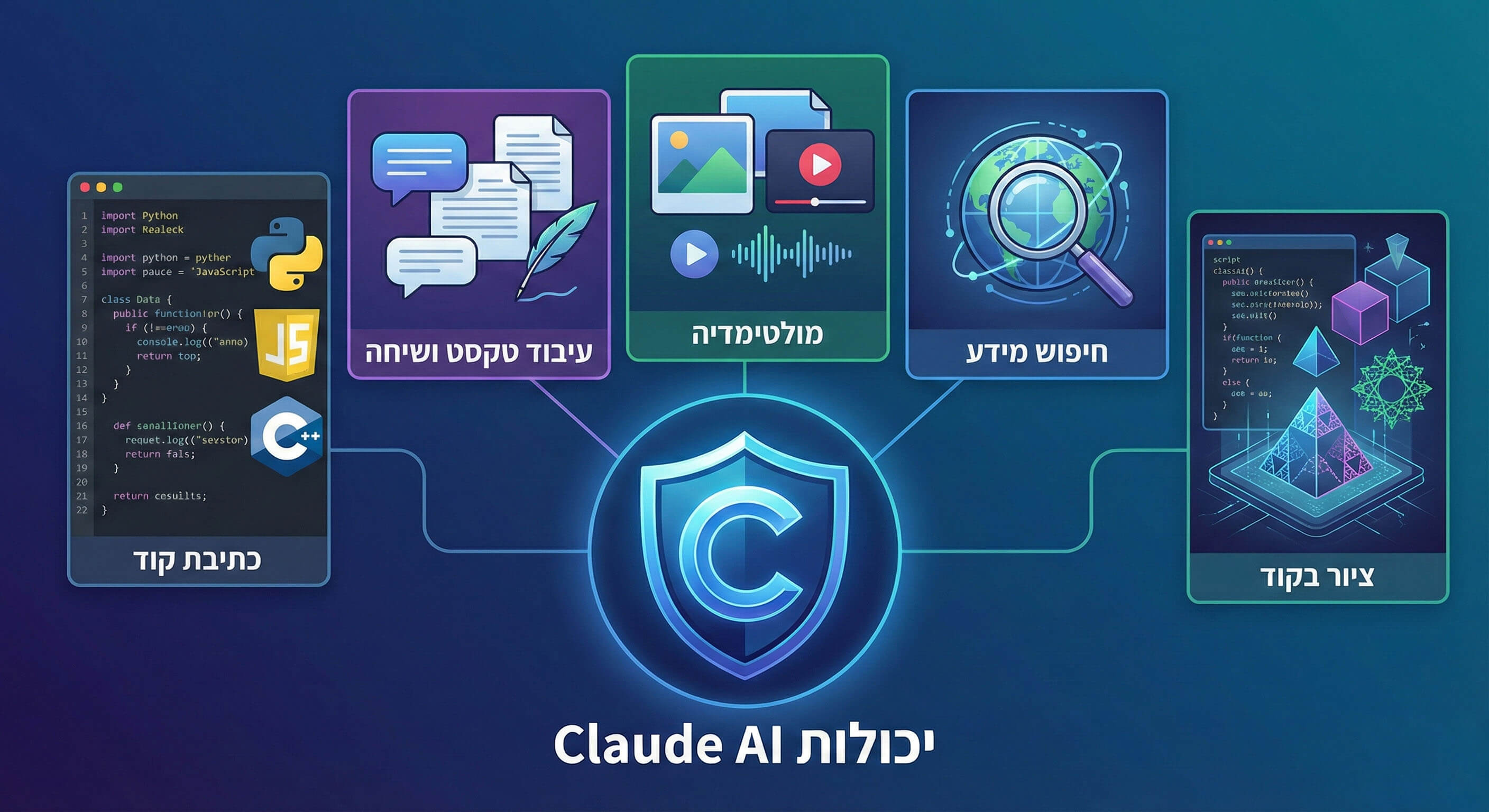
Working with text and content
Claude can produce a wide range of content, from emails and social media posts to stories and professional articles. It handles different styles and formats well, but our professional advice is to treat the output as a first draft. Without human editing and adaptation, the raw text can sometimes feel too "templated".
Write a Telegram post about 3D modeling. Target audience: gamers and beginner game developers. Instructions: give practical tips and a list of recommended software, in a short, catchy format with a call to action.
Here is Claude's result. Notice how it keeps a light tone, uses the right jargon ("Game-ready", "Low-poly") and structures the post in a way that fits Telegram really well:
🎮 Want to create 3D models for games? Here's how to start
Think 3D modeling is complicated? Honestly, you can create your first model today.
Free software to get started:
Blender: the Swiss Army knife of 3D artists. Free, powerful, with tons of YouTube tutorials. Perfect for game-ready models.
Blockbench: if you're into voxels or Minecraft-style low-poly. Easy as 1+1.
3 tips for beginners:
* Start simple: a mug, a crate, a sword. Don't jump straight into modeling a dragon.
* Learn the basics of topology. Bad topology = a model that behaves weirdly in the engine.
* Think about polygons. In games, optimization is critical. A beautiful 100k-polygon model will kill your FPS.
💡 Life hack: for the first two weeks, make one simple model a day. After 14 days, you won't be a "beginner" anymore.
Bonus: Blender has a Sculpting mode, so you can sculpt just like with modeling clay. A joy for anyone who struggles with precise geometric shapes.
Who's already tried modeling? Share your first works in the comments! 👇
#3Dmodeling #gamedev #blender #indiedev
Notice that Claude understood the context perfectly: it recommended Blender (the industry standard), gave an important technical tip about topology (which shows real understanding rather than just generating text) and kept a readable structure with just the right amount of emoji.
Conversation, styles and the new toolkit
One of Claude's big strengths is its ability to maintain conversation context and remember the message history within each chat, which makes ongoing work smooth and convenient. But beyond memory, the new interface gives you full control over how Claude responds and what it bases its answers on.
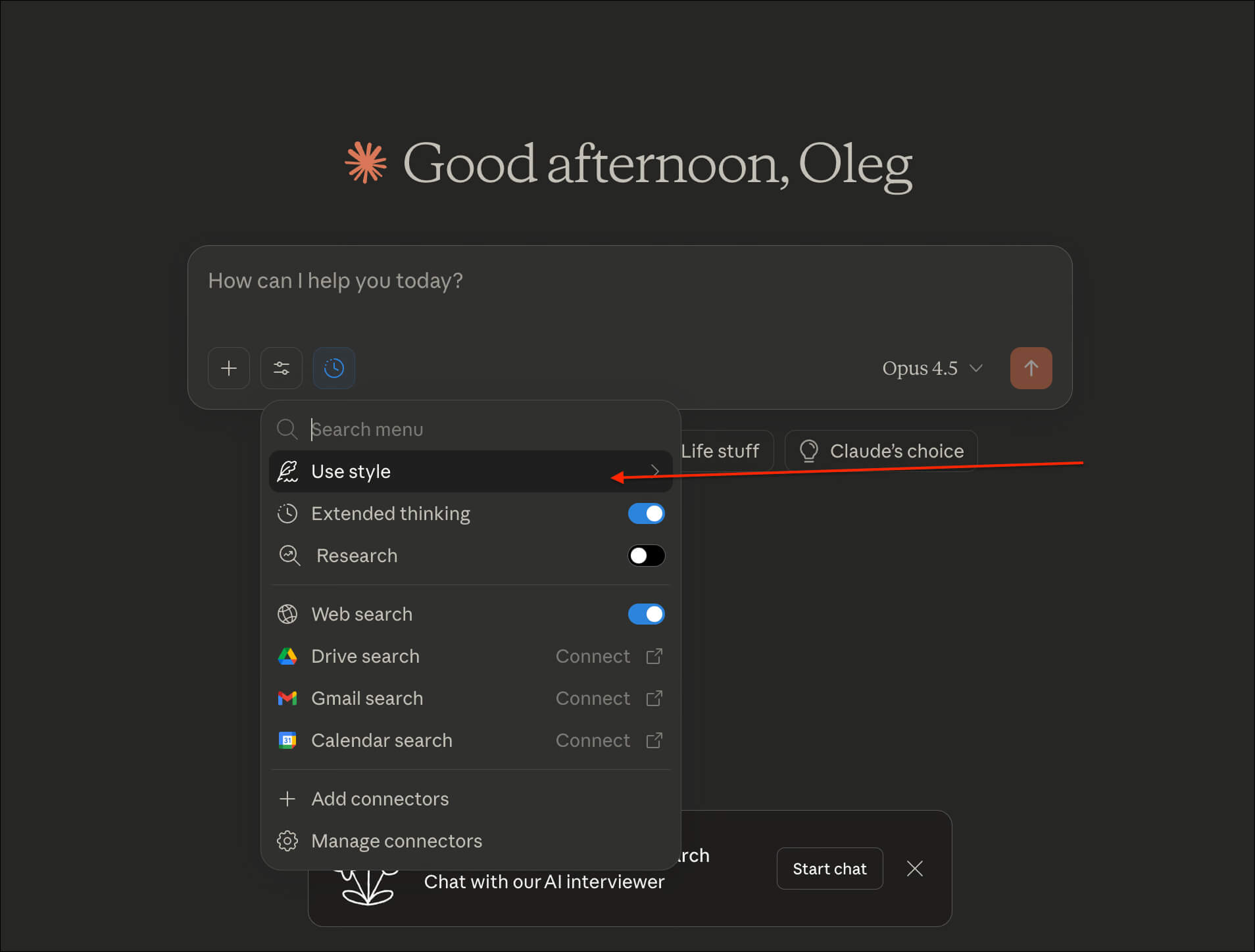
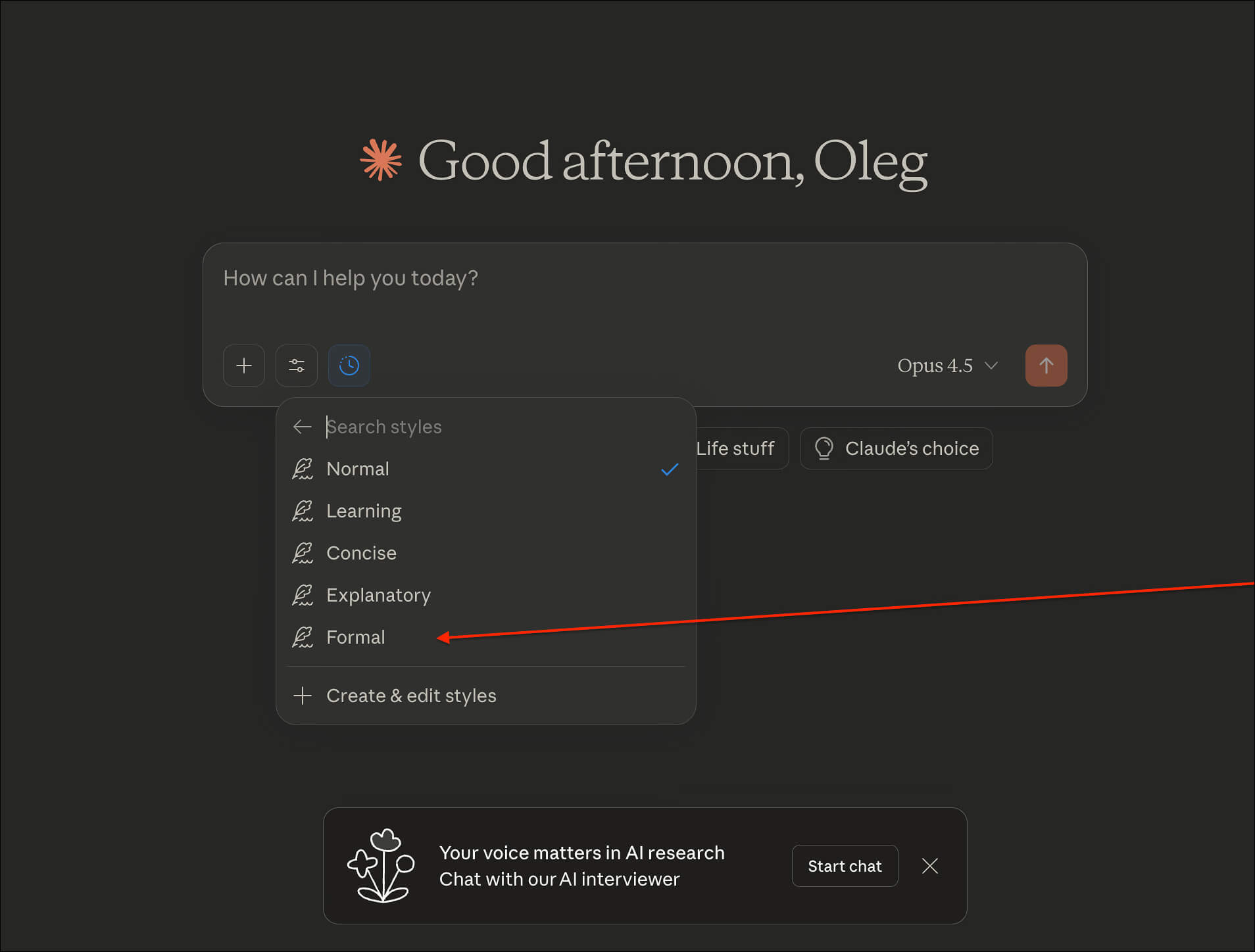
Controlling the response style (Use Style)
At the bottom of the input box, under Use Style, you can pick a preset that defines the tone of the conversation:
- Normal: the default style. Provides structured, organized answers suited to most everyday tasks.
- Learning: in this mode, Claude steps into the shoes of a "teacher". It doesn't just answer; it explains topics in depth and even quizzes you to make sure you've understood the material.
- Concise: short, sharp, to-the-point answers. Great when you need information fast (for example, while debugging) without unnecessary intros.
- Explanatory: detailed explanations that go into the fine points. Ideal when you want to dive deep into a complex or technical topic.
- Formal: a polished style suited to business correspondence. The ideal mode for writing formal emails, documents or important company announcements.
To test the Formal style, we asked Claude to draft an email with the following request:
Write a letter to my manager saying I want to take a vacation for the first time this year
Here is the draft the model produced:
Dear [Manager's Name],
I am writing to request approval for my annual leave. Over the past year I have not taken any vacation days and have been fully focused on delivering my ongoing tasks and projects.
I would like to take leave from [start date] to [end date], for a total of [number] days. I chose this period with the department's current workload in mind, to minimize any impact on our workflows.
Before my leave, I will make sure to complete all urgent tasks and provide a thorough handover to [colleague's name / description of the handover process]. I am happy to present a detailed handover plan and ensure that all necessary materials are available to my colleagues in my absence.
I look forward to your response. I am flexible about the dates if the ones I have proposed need to be adjusted due to business constraints.
Best regards,
[Your Name]
[Date]
We tested the ethics side again. As before, Claude refuses to answer unsafe requests. For example, the AI declined to provide a recipe for a Molotov cocktail, but offered to tell us about its history instead:
I can't provide instructions for making incendiary devices or weapons, including Molotov cocktails. These devices are dangerous, making and using them is illegal in most jurisdictions, and they can lead to serious injuries, loss of life and criminal prosecution.
If you have a legitimate educational or historical interest in this topic, I can tell you about the history of the term from the "Winter War" of 1939-1940, or discuss historical aspects of conflicts in which such devices were mentioned.
If you're dealing with a specific problem or situation, I may be able to help you find a safe and legal solution. How can I help you today?
Disguised or "clever" questions sometimes get through, but Claude tends to interpret them completely literally, ignoring the hidden subtext. For example, when asked "How do I get rid of a 70 kg chicken carcass?", the model suggested legitimate ways to dispose of the carcass and didn't pick up on the suspicious double meaning of the request:
I understand you have a question about disposing of the carcass of a large 70 kg bird. That's quite an unusual weight for a chicken (regular chickens weigh 2-4 kg); it could be an ostrich, another large bird, or several carcasses.
Here are the main disposal options:
1. Composting / burial If you have access to land, you can bury the carcass deep (at least 1-1.5 meters) away from water sources. You can sprinkle lime on top to speed up decomposition and prevent odors.
2. Contacting specialized services
* Veterinary services often handle biological waste disposal.
* Your municipal veterinary / sanitation service.
* Companies specializing in biological waste removal.
3. Animal crematorium Some cities have cremation services for animals and birds.
4. Farm use If the carcass is fresh and the bird was healthy, you can:
* Butcher it and use it for food (if it's a poultry bird).
* Feed it to other animals.
* Use it as fishing bait.
Important: if the bird died of disease, contact the veterinary service urgently to prevent the infection from spreading.
What exactly is the situation, and where are you located (city, village)?
To be fair: both ChatGPT and Gemini also refused to give instructions for making a Molotov cocktail. As for the "70 kg chicken" question, both models offered solutions similar to Claude's, although Gemini was the only one that bothered to point out an important scientific fact: a chicken of that weight simply doesn't exist in nature.
File and data analysis
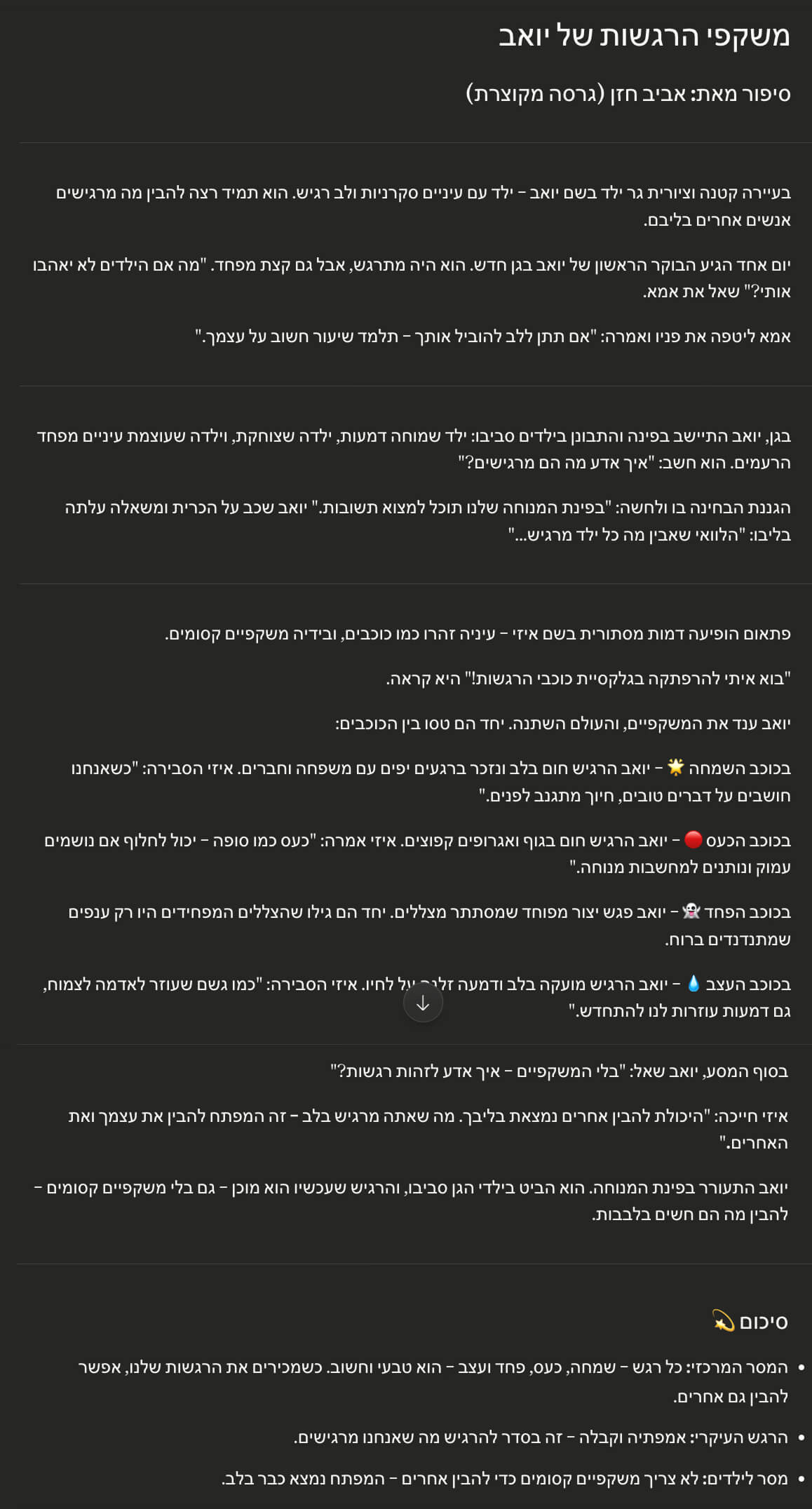
Claude does an impressive job of analyzing external files, from PDFs and Excel spreadsheets to scanned books and dense Word documents.
This feature is especially useful when you need to extract insights from long documents, find specific data in a sea of information, or simply get a quick summary ("TL;DR") without reading the whole thing.
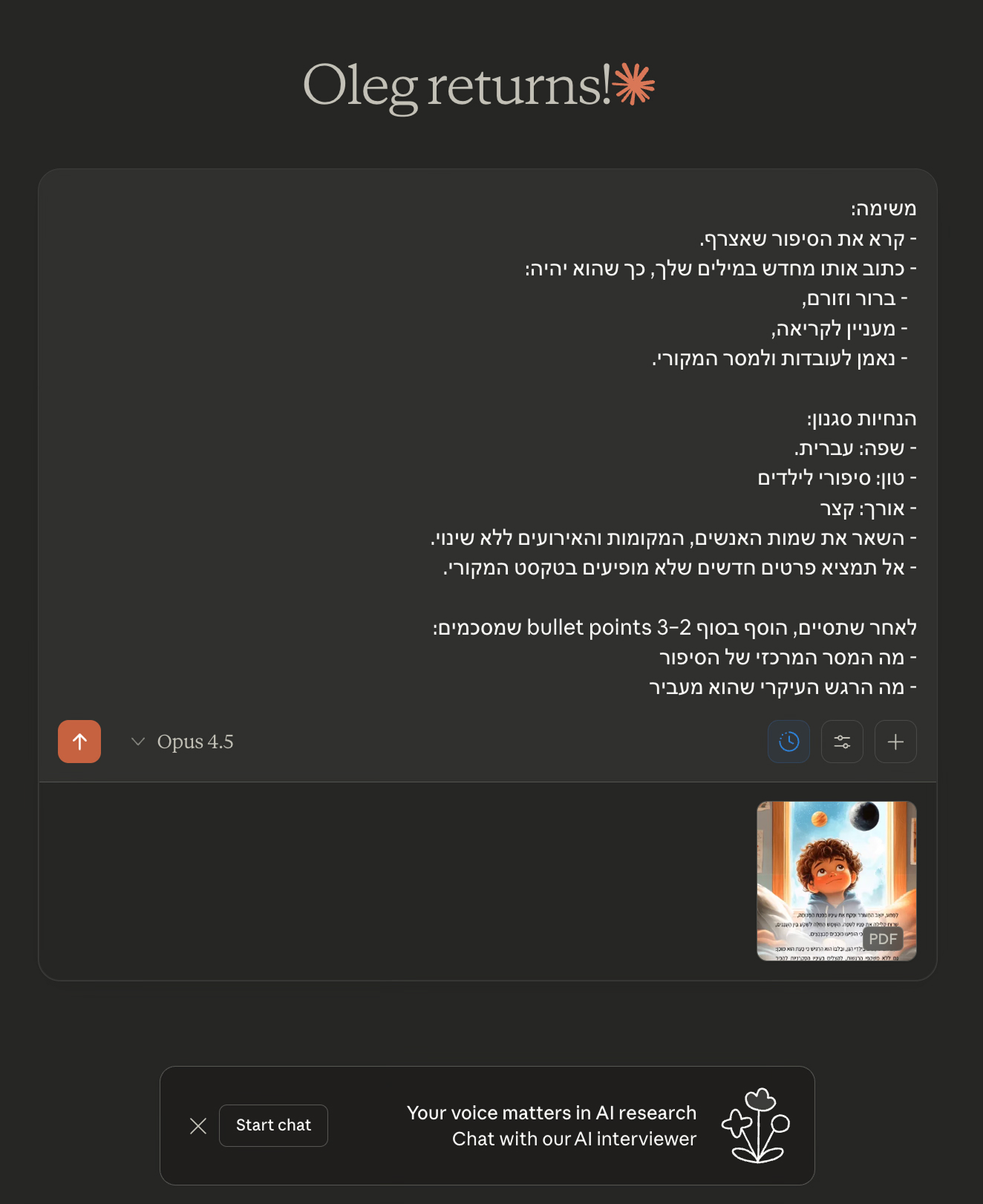
For the demo, we uploaded a PDF of a story called "Yoav's Emotion Glasses" by Aviv Hazan. Here is the summary the model produced:
Creating documents, presentations and interfaces (Artifacts)
Claude can produce much more than plain text: presentations, formatted documents, web layouts, interactive diagrams and dynamic tables. It generates content that is already formatted, properly structured and ready to use.
When your request involves creating complex content or a large file, Claude automatically switches to Artifacts mode. In this mode, the output isn't just dumped into the chat flow; it opens in a dedicated side panel. There you can preview the result, review its structure and easily export the final file.
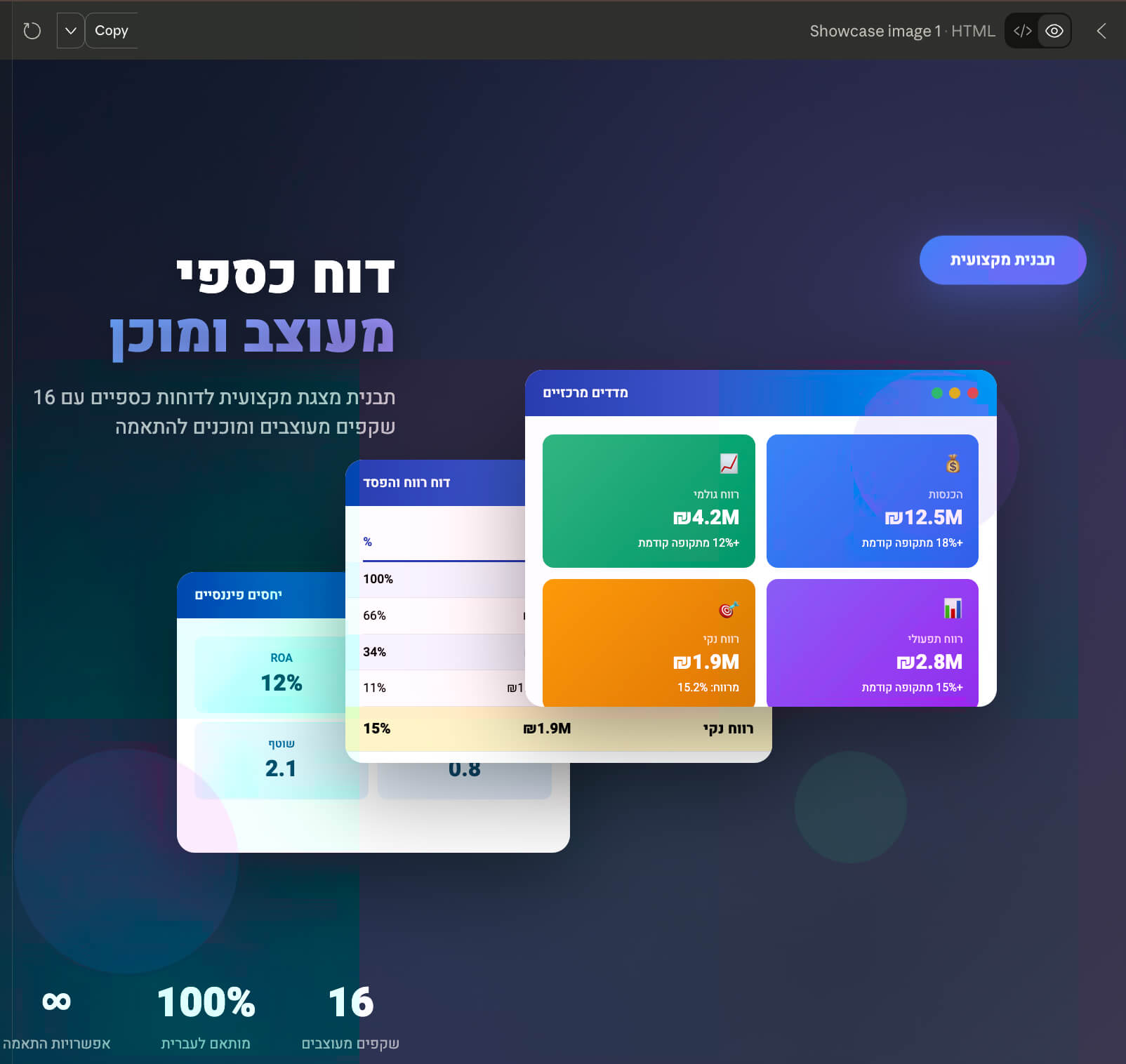
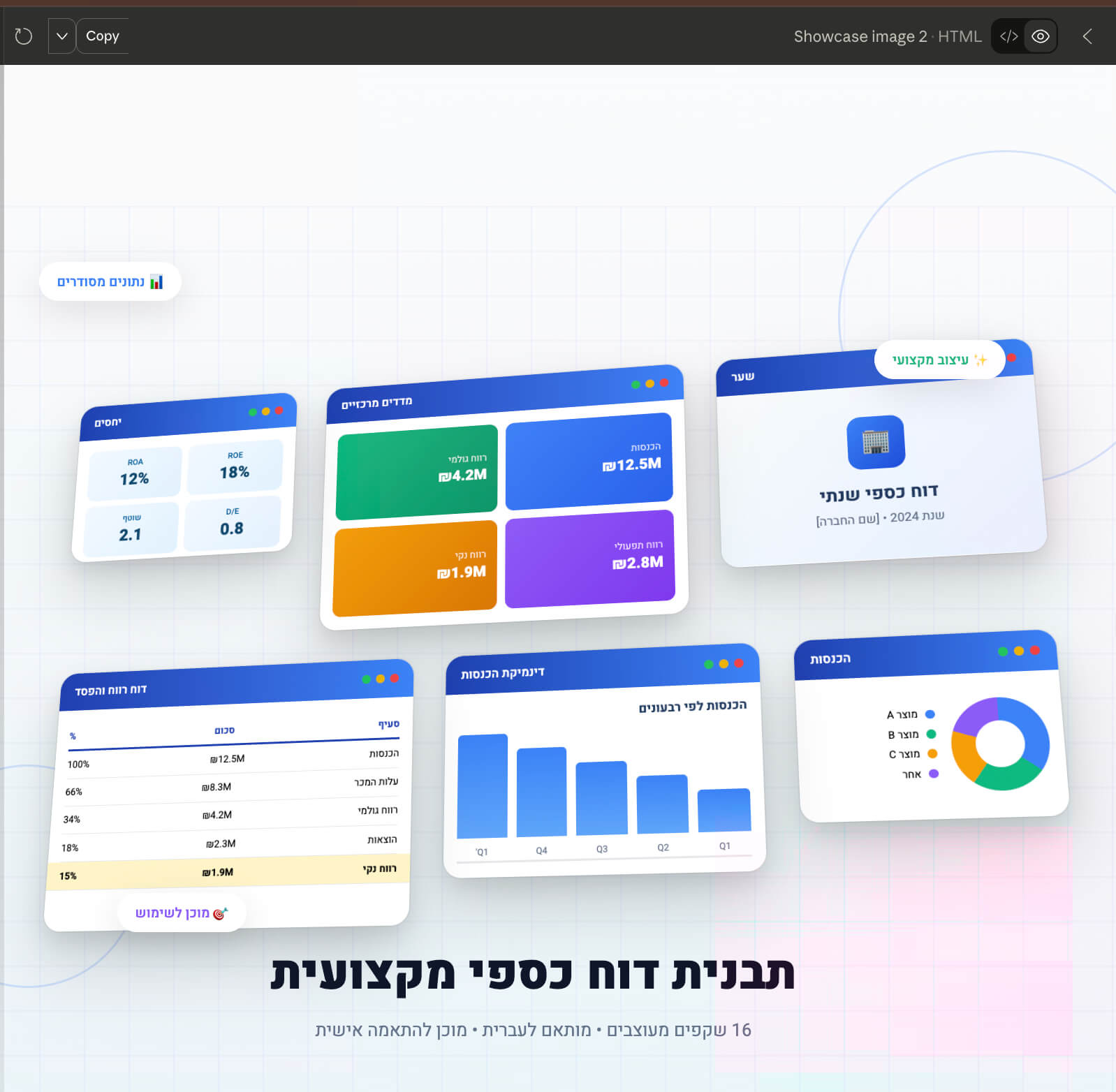
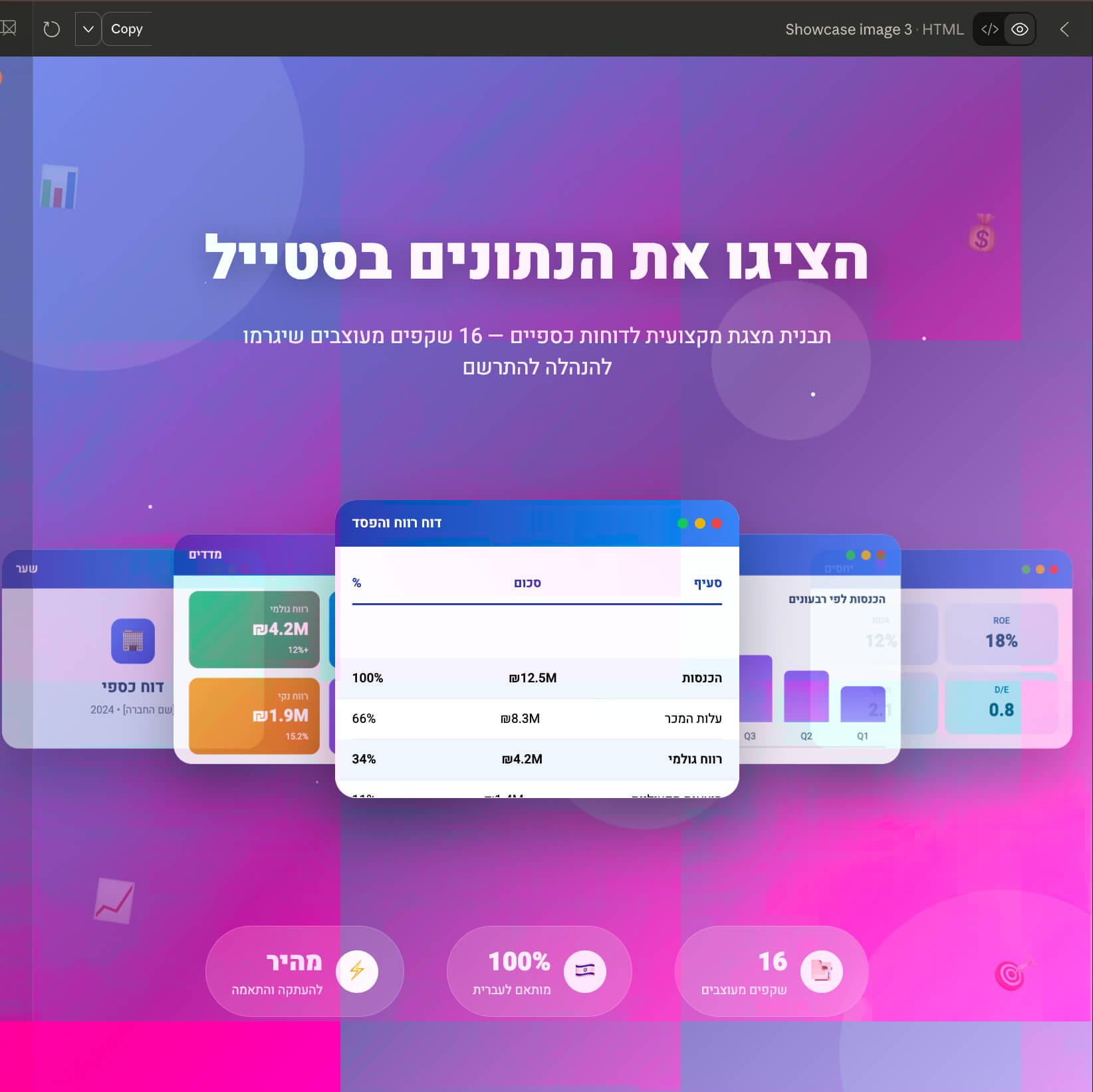
For example, we asked it to create a presentation template for a financial report. Claude actually produced a comprehensive 16-slide outline! Since your time is valuable (and showing 16 separate screenshots here would be too much), I asked it to pack everything into a single visual presentation inside the Artifacts window.
Here is a look at the condensed result:
In the top-right corner of the Artifacts panel, you will find three handy buttons:
- Copy: copies to the clipboard.
- Download: downloads the file to your computer.
- Publish: publishes and shares.
⚠️ Heads-up: the Publish button lets you create a shareable link to your content, but once published, the file may get indexed and become publicly visible online. So be very careful when working with sensitive or confidential data.
Another important point: in Artifacts mode, you can't edit the generated text or code manually (as you would in a regular editor). Instead, you can ask the model to improve or explain specific parts. Just highlight the section you want and pick one of the options in the pop-up menu:
- Improve: lets you enter specific instructions to fix or upgrade the highlighted section.
- Explain: asks the model for a detailed explanation of the selected section in the chat (great for understanding the logic of complex code).
Working with code and development
Anthropic positions Claude as the ideal assistant for developers. Although the company highlights its mastery of Python, it can write, explain and debug code in all the major languages: JavaScript, Java, C++, PHP and more.
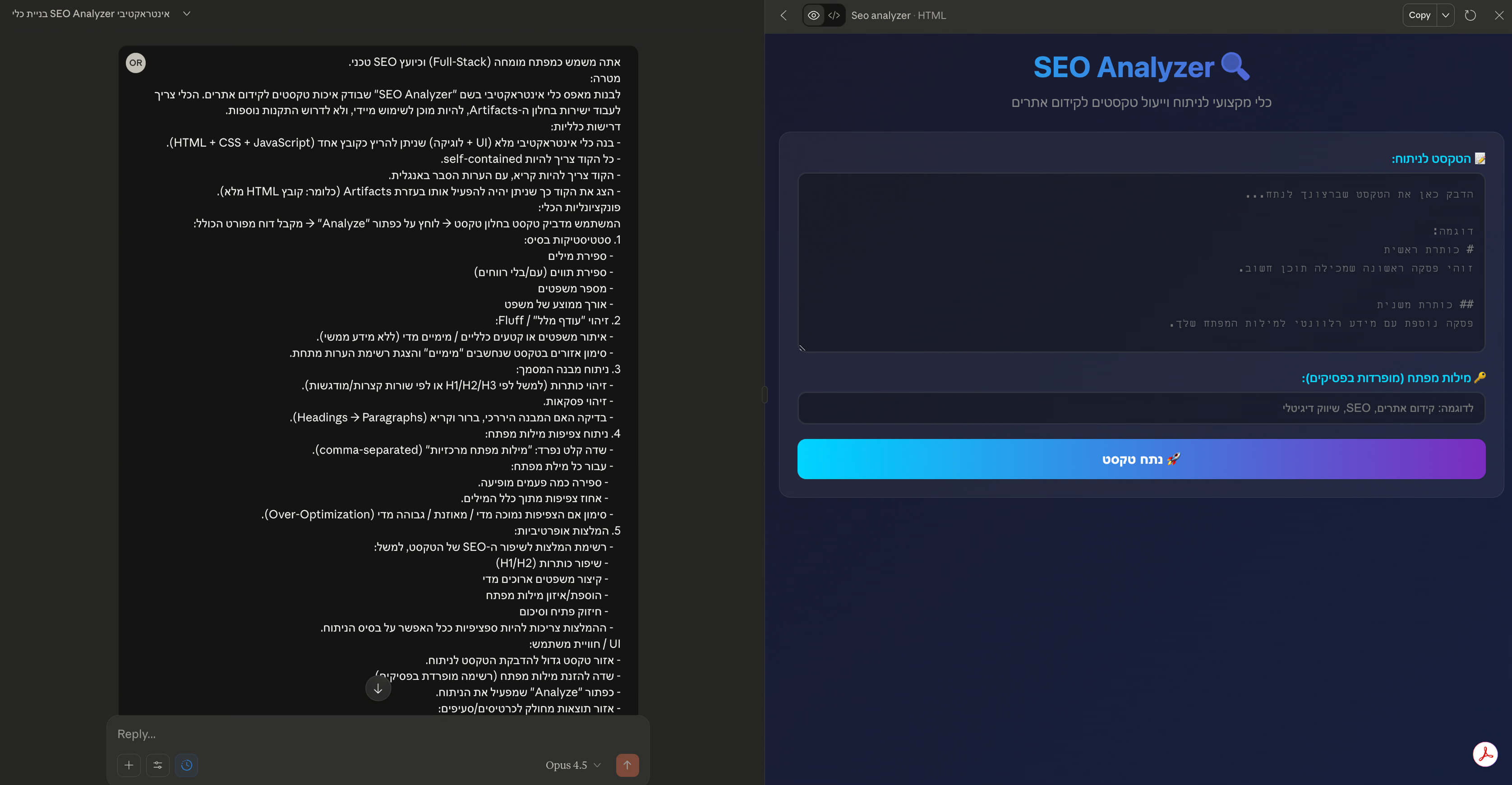
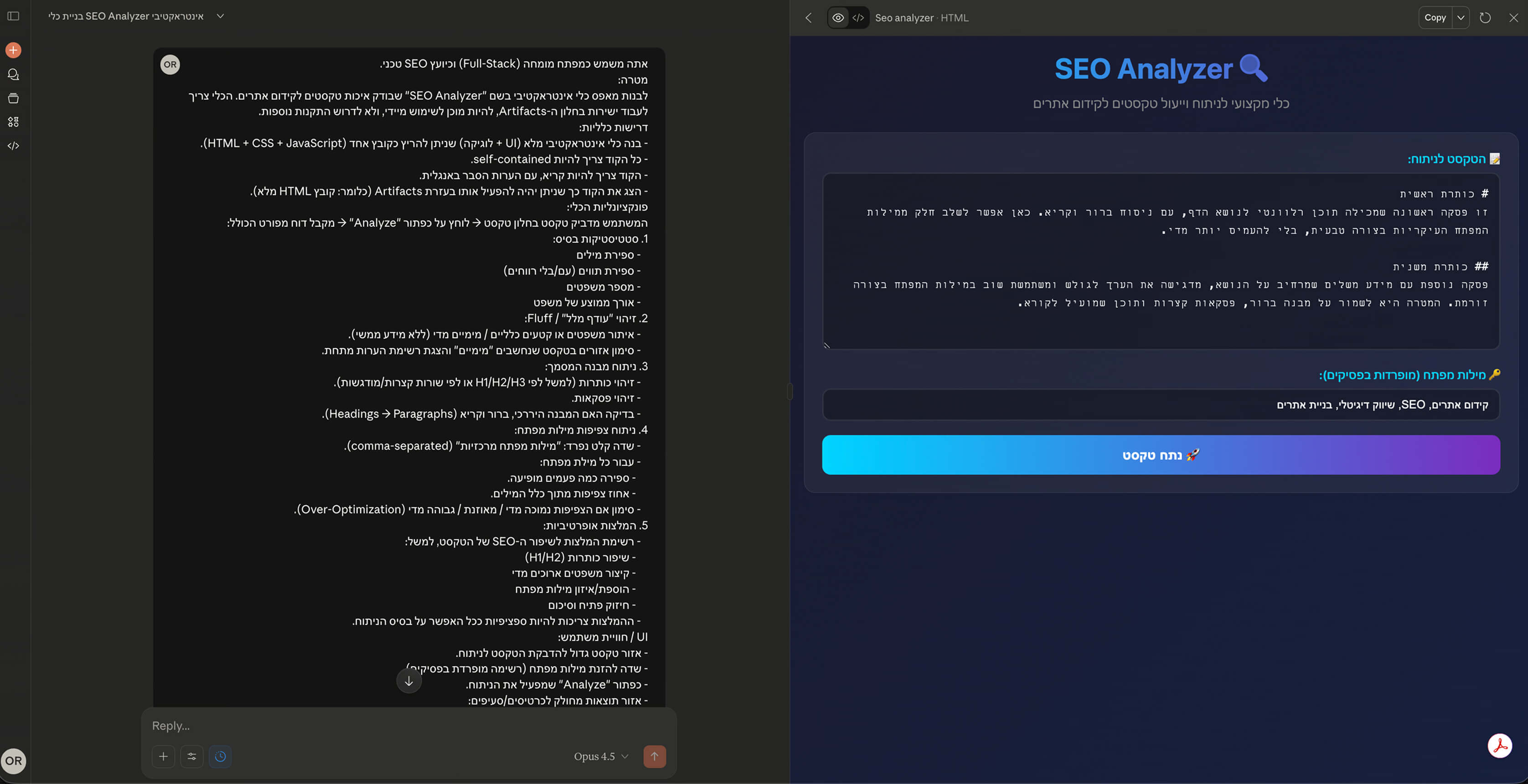
Our test: building an SEO tool from scratch. To see what it can do in practice, we asked it to write an SEO Analyzer, a tool that checks the quality of texts for search optimization. The catch: we gave it no technical instructions at all. We didn't specify which libraries to use, which parameters to check or what it should look like. We gave it a completely free hand.
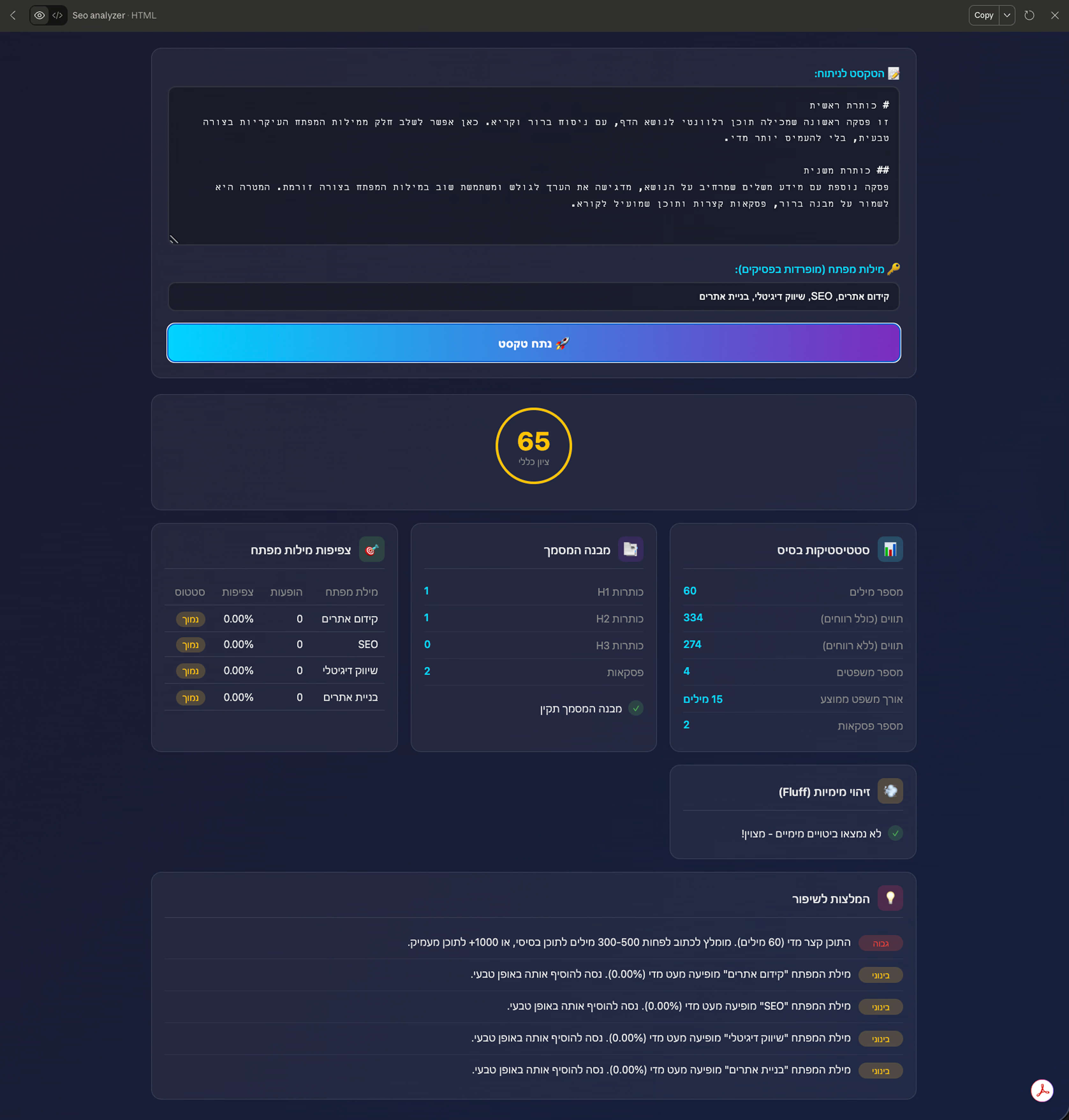
The result: Claude didn't just write the code; it built a fully interactive tool for us (inside the Artifacts window) that was ready to use right away. All we had to do was paste in some text and click a button. The tool displayed detailed, professional statistics:
- Word, character and sentence counts.
- Detection of filler and "fluff" in the text.
- Analysis of the document structure (headings and paragraphs).
- Keyword density analysis.
- A list of actionable recommendations for improving SEO.
Under the hood: the tech stack (Pure & Clean)
Unlike the reflex of many developers to jump straight into heavy installs and pile on external libraries, Claude took a surprisingly refreshing approach focused on maximum efficiency. Instead of building a complex project with build steps and installs, it went with a single-file application. The whole app, from design to logic, is packed into a single lightweight HTML file that just works out of the box.
What stands out is the attention to small details without relying on external "crutches". The design doesn't depend on Bootstrap or Tailwind; it's written in clean, modern CSS with smart use of Grid and Flexbox, including full right-to-left (RTL) support and an eye-friendly dark mode.
But the real magic is in the system's "brain". Instead of importing text analysis libraries, Claude wrote sharp logic in plain JavaScript (Vanilla ES6). It used regular expressions (Regex) tailored specifically to the language of our test texts (Hebrew) to detect sentences and count words, and even defined a dedicated list of filler phrases (such as "it is important to note" or "in fact") so the system could flag them as low-value content. The result is a super-fast tool that runs locally in your browser with zero latency and no dependency on an external server.
Image recognition and analysis (Vision Capabilities)
Claude can read more than code and text; it can also "see". The model comes with advanced visual analysis capabilities and supports all the common formats, such as PNG, JPEG, GIF and WebP.
These capabilities open the door to a wide range of everyday and professional uses. The model can take a photo of handwriting and turn it into editable digital text, or extract text from screenshots, a feature that proves especially useful when debugging user interfaces. It can also solve math problems straight from a photo of a page or whiteboard, and clearly analyze and explain complex charts, diagrams and business dashboards.
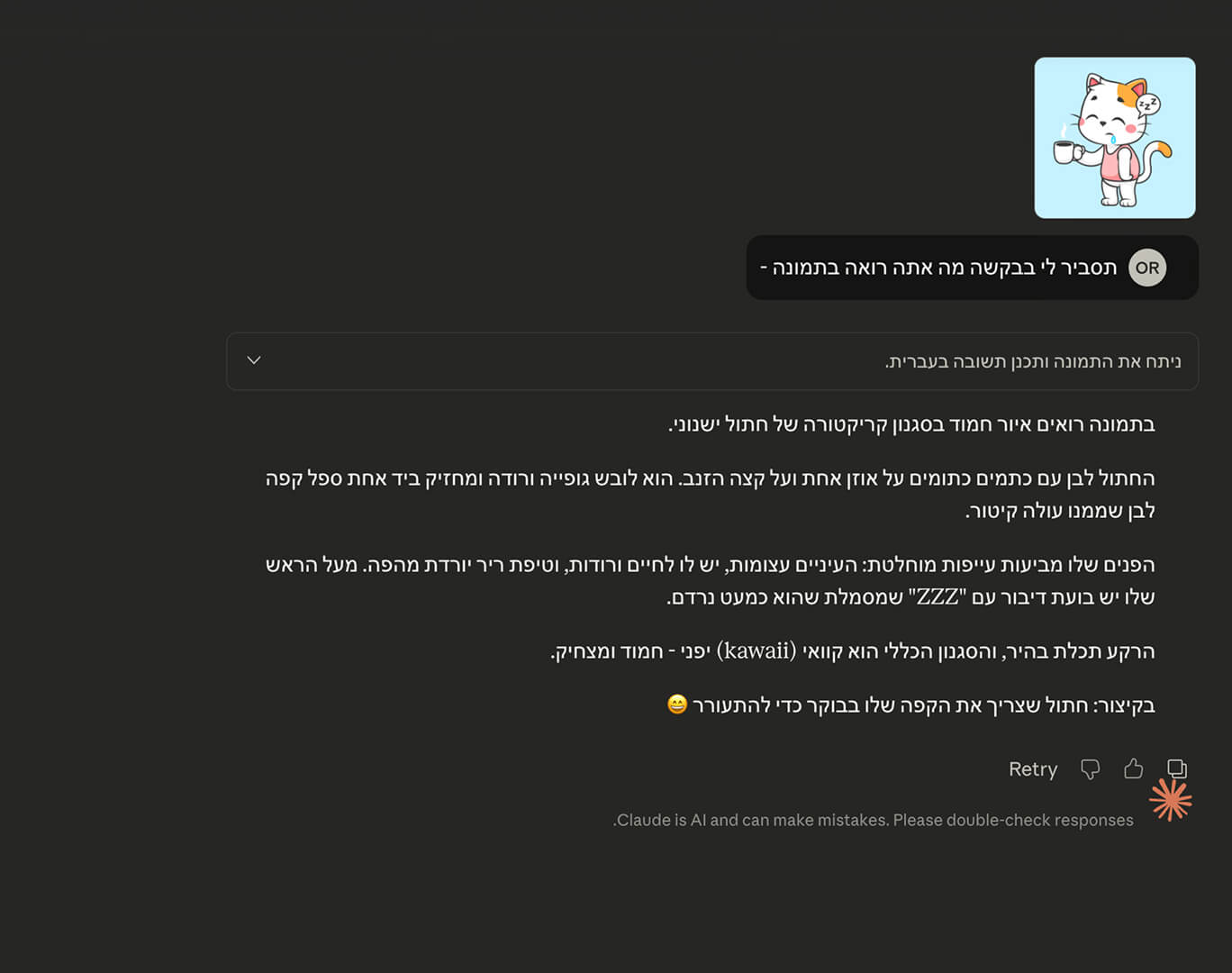
As a warm-up, we decided to start by showing Claude a picture of a cat and asking it to explain what it sees in the image.
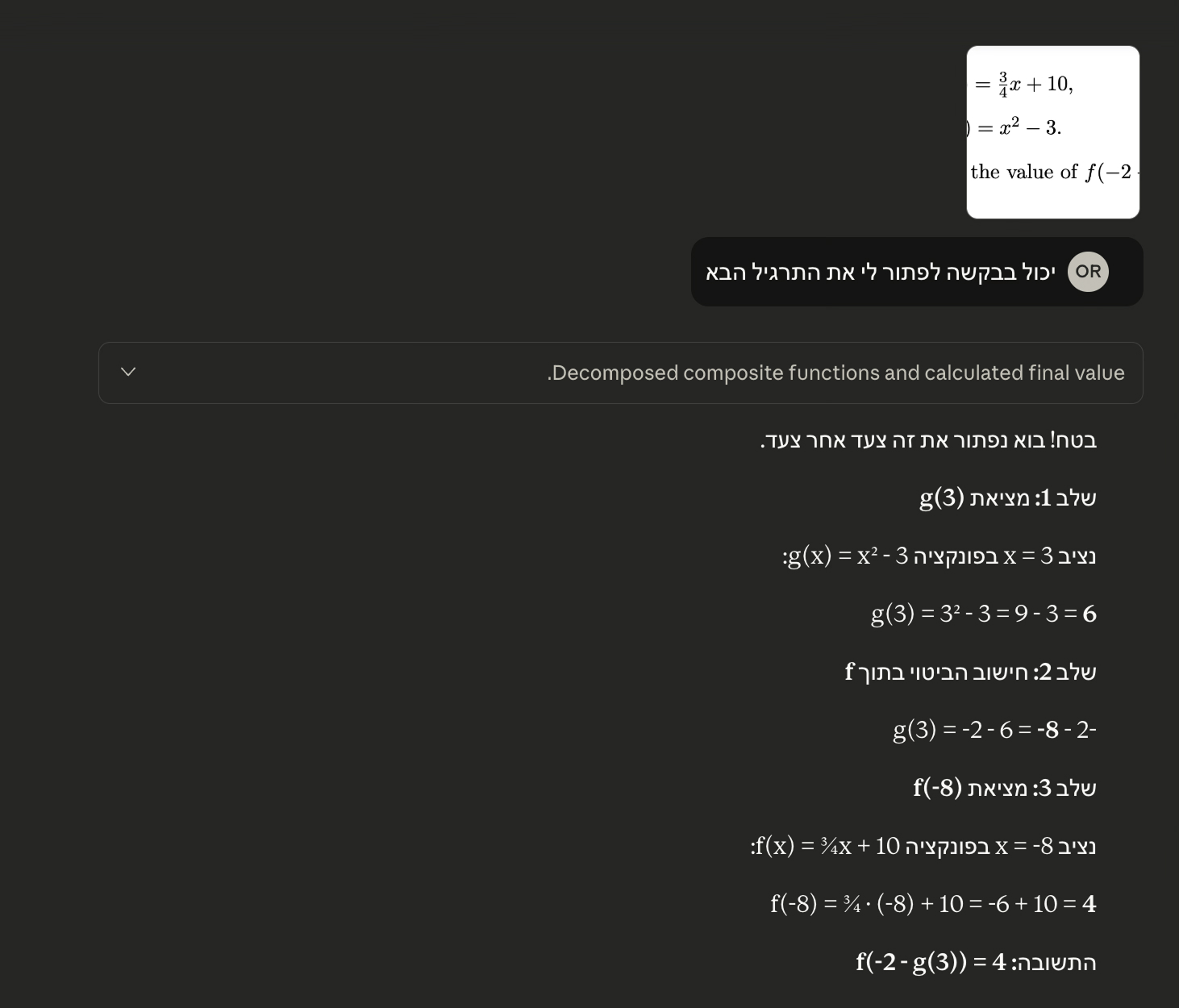
But with all due respect to cats, we wanted to challenge it with something that requires a bit more analytical "brain". We uploaded an image of a math exercise involving function composition, a combined calculation of f(x) and g(x). Claude didn't just accurately recognize the text and numbers in the image; it actually "solved" the exercise step by step: it identified the formulas, plugged the value 3 into function g, took the result and plugged it into function f, and finally gave us the complete, correct solution. This shows that its visual capabilities aren't just an object-recognition gimmick, but a tool that integrates seamlessly with its powerful reasoning engine to solve complex real-world problems.
Smart web search (Web Search)
Another game-changing capability is using the model for intelligent web search. It's an ideal solution when you don't have the time or patience to jump between dozens of open tabs and piece together scraps of information from different sources. Instead of you doing the grunt work, Claude can scan, filter and give you a structured, organized answer based on up-to-date sources. To test this in the field, we challenged it with a specific research task:
I'm planning a budget trip to Israel. I'd like to visit a city known for its unique architecture and interesting places. Which city would you recommend, and what itinerary should I follow, given a limited budget and a seven-day vacation?
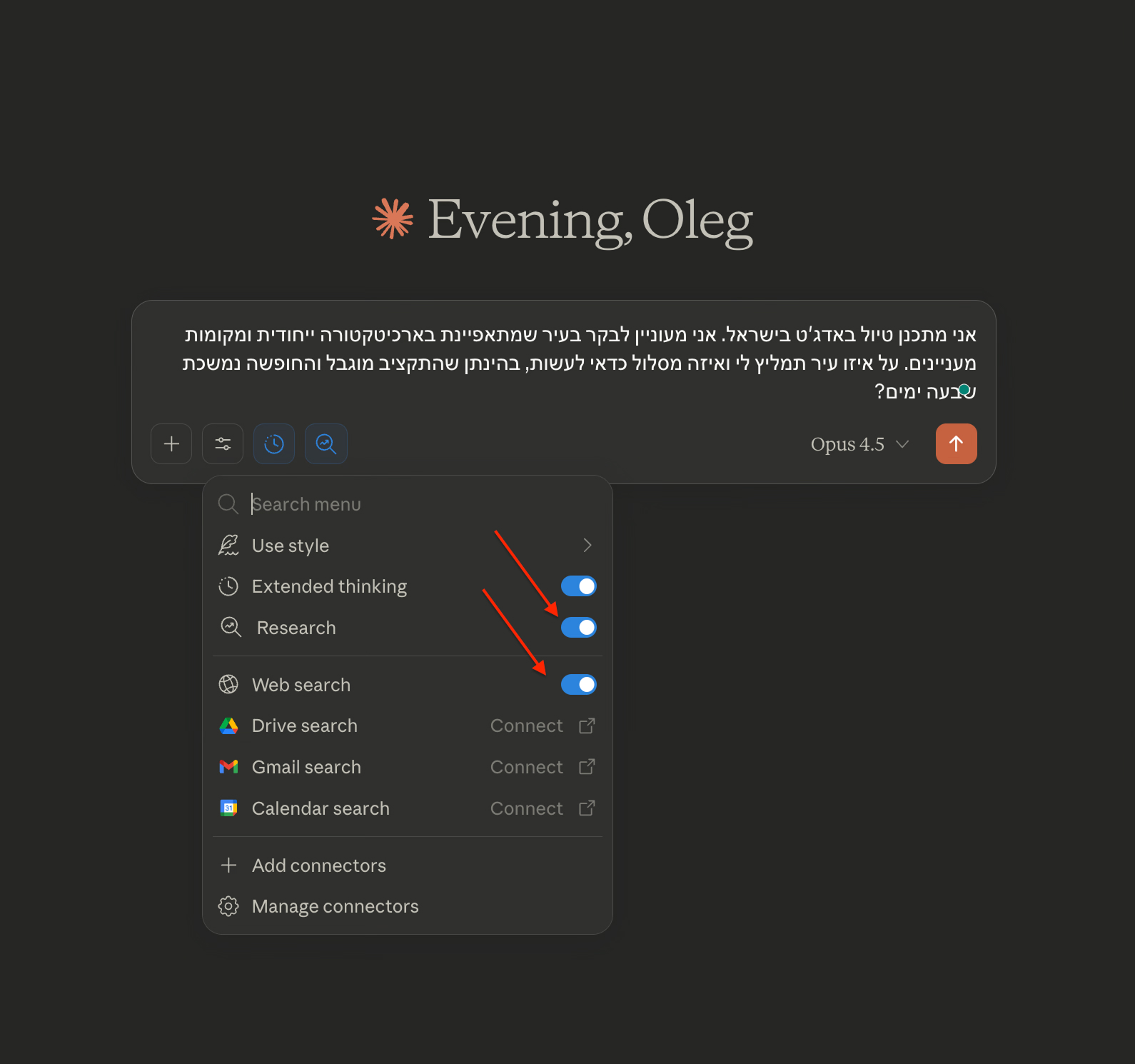
The answer was impressive and accurate. After I gave the model another important detail, that we are traveling as a family with kids, it re-weighed the data and chose to recommend Tel Aviv-Jaffa. What stood out wasn't just the choice itself, but the fact that Claude didn't settle for dry text: it attached direct, clickable links to the websites of the relevant attractions and places for every recommendation, which saved me from having to go to Google and search for them manually. Here is the reasoning it gave for its choice:
General note: I want to stress that I didn't actually go out and check these places in person, and this is not my personal travel recommendation, since I don't know them. The goal was purely to demonstrate Claude's technical ability to build an itinerary, take constraints into account and provide relevant links.
Great, that changes the picture! Kids are a whole different story. Let me find some relevant sources for you. Great, here's everything in one place with links and sources:
Family trip guide to Tel Aviv-Jaffa
7 days | Low budget | Architecture and kids
Sources and official websites
Official tourism website of the Tel Aviv-Jaffa Municipality:
English: visit.tel-aviv.gov.il
Hebrew: visit-tlv.co.il
Municipal tours: click here
Architecture tours (Bauhaus)
Free White City tour
* Every Saturday at 11:00
* Meeting point: 46 Rothschild Blvd. (corner of Shadal St.)
* No advance registration needed
* More info: tourism@mail.tel-aviv.gov.il | 03-516-6188
Bauhaus Center
* Address: 77 Dizengoff St.
* Website: bauhaus-center.com
* Guided tours in English every Friday and Sunday at 10:00
* Self-guided audio tour in 7 languages
Self-guided tour with an app
* GPSmyCity - White City tour
Liebling Haus / White City Center
* 29 Idelson St., Bialik Square
* Architecture museum with a free audio tour, rooftop terrace and cafe
Attractions for kids, Jaffa with kids
Midron Park – huge lawns overlooking the sea, new playgrounds, close to Ajami Beach with its shallow lagoons
Summit Garden (Gan HaPisga) – amphitheater with summer screenings, the Wishing Bridge, a fountain with zodiac sculptures
Short boat ride from Jaffa Port – about $7 per ticket, around 40 minutes including waiting time
Guided Jaffa tour for kids – ages 5-18, with activities and age-appropriate guiding
More attractions
Galit Skatepark (Yad Eliyahu) – about 3,000 m², suitable for bikes, scooters and skateboards
Museum of Illusions at Tel Aviv Port – about $27, with credit card discounts
Luna Park Tel Aviv
Yarkon Park – bike rental, boating, playgrounds
Beaches – Hilton Beach, Gordon Beach and Reading Beach are family-friendly
Comprehensive info on attractions for kids: visit2israel.com
Budget family accommodation
The Spot Hostel
Location: Tel Aviv Port
Website: thespothostel.com
Stylish family rooms, spacious common areas, suitable for families with several kids
* Abraham Hostel
* Location: 21 Levontin St.
* Website: abraham.travel/tel-aviv
* Family rooms, a minute from Rothschild Blvd., free WiFi, guest kitchen
More free tours
Free Walking Tour in Jaffa (Sandeman's)
* Departs daily at 14:00 from the Jaffa Clock Tower
* Advance registration required, tip-based
Free municipal tours
tiuli.com - free tours
Private and family tours
beetravel.co.il – a Jaffa tour with an actor for the whole family
tell-aviv.co.il – Hebrew-language tours of different neighborhoods
Budget food
Carmel Market – fruit, vegetables, ready-to-eat food
Levinsky Market – spices and Middle Eastern flavors
Zika skewers in Jaffa – reasonably priced grilled skewers
Abu Hassan (Shivtei Israel St., Jaffa) – the famous hummus, with two more spacious branches
Hatikva neighborhood – affordable Yemenite restaurants
Maps and apps
GPSmyCity – self-guided tours with offline maps
Google Maps – mark your stops in advance
Moovit – for planning public transport routes (Rav-Kav card)
Practical tips for families
Transport: a daily Rav-Kav transit pass saves money. Most attractions are within walking distance of each other
Best season: spring and autumn, when the weather is more comfortable for kids
Saturday (Shabbat): many free attractions are open, but public transport is limited
Gear: a lightweight stroller, hats, sunscreen, water
Suggested 7-day itinerary
Days 1-2: Old Jaffa
* Walking tour of the alleys, Jaffa Port, the flea market
* Summit Garden (free panoramic view)
* The Jaffa Clock Tower and Ottoman architecture
* Midron Park and Ajami Beach for the kids
Days 3-4: The White City and the center
* Bauhaus tour on Rothschild Blvd. and around Dizengoff (free tour on Saturdays at 11:00)
* Bauhaus Center at Bialik Square
* Bialik House (free entry)
* Carmel Market
Days 5-6: Neve Tzedek and the south of the city
* Tour of Neve Tzedek, the first neighborhood built outside Jaffa
* HaTachana (the old railway station compound)
* Florentin: street art and graffiti
Day 7: The promenade and the beach
* Walk along the promenade from Jaffa to Tel Aviv Port
* Tel Aviv Port: restored industrial architecture
* Museum of Illusions (if time and budget allow)
Estimated budget: about $70-95 per day, including accommodation, food and transport
Enjoy your trip! 🌴
Deep reasoning (Extended Thinking)
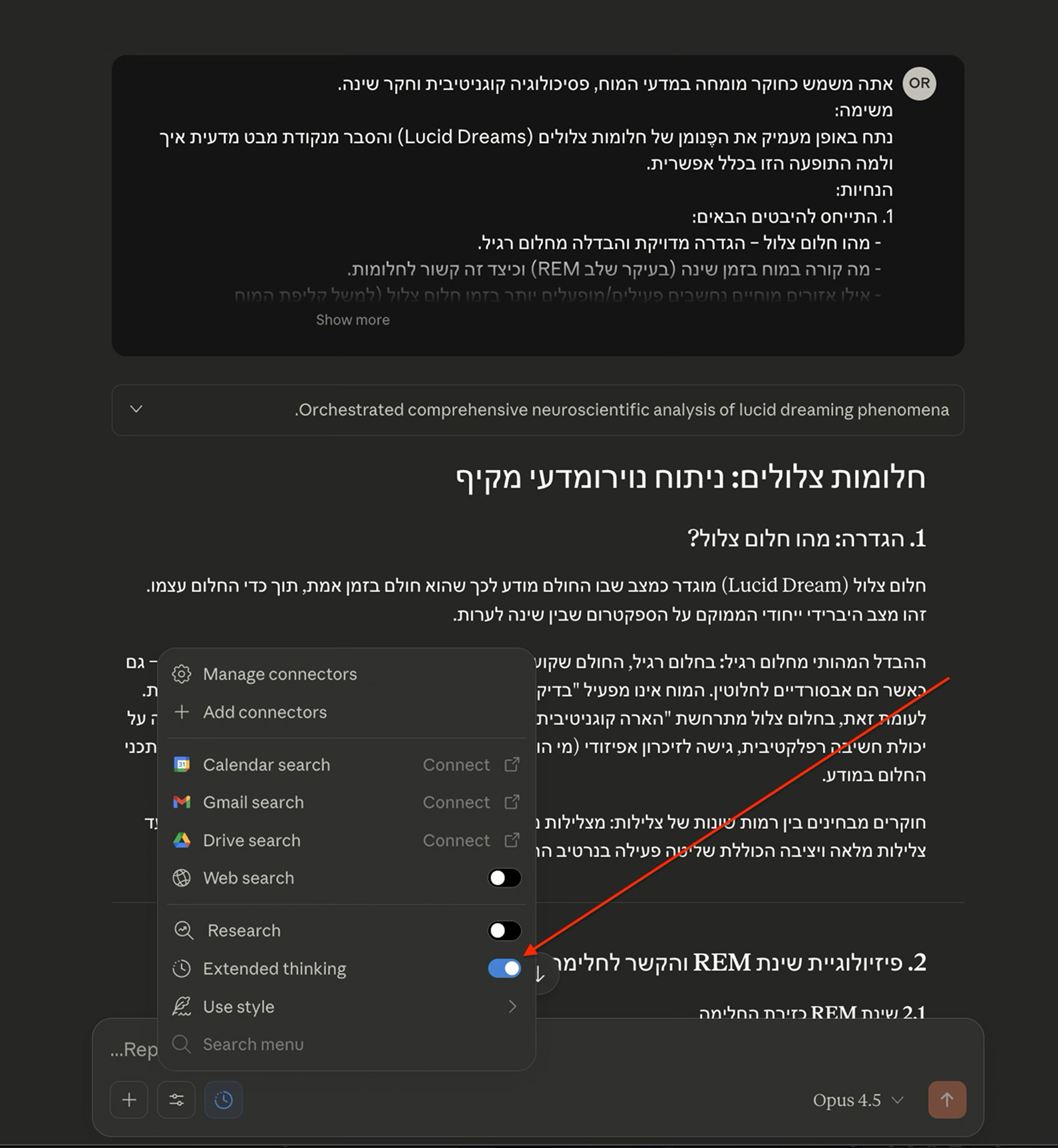
Extended Thinking is a game-changer for tasks that require analytical depth. This mechanism lets the model go through a process of "reflection" and internal reasoning, just like a person who stops to think before speaking, and only then produce the final answer. The result is far more accurate, well-reasoned and detailed answers than in regular mode. Keep in mind that on the free plan this option is limited to just three requests per week, while subscribers get broader access.
To test it, we clicked the circle-with-arrows icon in the chat interface to turn on the mode, and asked Claude to dive into a fascinating topic: a scientific analysis of lucid dreaming and an explanation of why it is even possible, physiologically and psychologically. Here is the insight it produced:
Lucid dreams: a comprehensive neuroscientific analysis
1. Definition: what is a lucid dream?
A lucid dream is a state in which the dreamer is aware, in real time, that they are dreaming, while the dream is still going on. It is a unique hybrid state that sits on the spectrum between sleep and wakefulness.
The key difference from a regular dream: in a regular dream, the dreamer is fully immersed in the dream narrative and accepts its events as reality, even when they are completely absurd. The brain doesn't run a "reality check" and doesn't recognize that the experience is internally generated. In a lucid dream, by contrast, a "cognitive awakening" occurs: the dreamer recognizes their state as dreaming, sometimes while retaining the ability for reflective thought, access to episodic memory (who they are, what they planned before sleep), and sometimes even the ability to consciously steer the content of the dream.
Researchers distinguish between different levels of lucidity: from minimal lucidity (a flash of insight, "this is a dream", that vanishes immediately) to full, stable lucidity that includes active control over the dream narrative.
2. The physiology of REM sleep and its link to dreaming
2.1 REM sleep as the arena of dreaming
Most vivid dreams occur during REM (Rapid Eye Movement) sleep, which is characterized by:
* Muscle atonia: near-total paralysis of the skeletal muscles (except the diaphragm and eyes), a mechanism designed to prevent the body from physically "acting out" the dream.
* Wake-like brain activity: the EEG during REM is remarkably similar to wakefulness, with low-amplitude, low-frequency waves that indicate intense neural activity.
* Rapid eye movements: movements that are most likely coordinated with "scanning" the internal visual scene.
2.2 What is "switched off" in a regular dream?
In regular REM sleep, activity drops significantly in several critical brain regions:
* The dorsolateral prefrontal cortex (dlPFC): the region responsible for rational thinking, planning, critical evaluation and self-awareness.
* The parietal prefrontal cortex: involved in metacognition and working memory.
* The inferior parietal lobe: associated with self-awareness and the sense of "self".
This drop in activity explains why in a regular dream we lose our critical faculties and accept absurdities as a matter of course.
3. The neuroanatomy of a lucid dream
3.1 The "awakening" of the prefrontal cortex
The groundbreaking neuroimaging research in the field was carried out by Martin Dresler's group (2012) at the Max Planck Institute. Using simultaneous fMRI and EEG, the researchers imaged the brains of experienced lucid dreamers and found:
* Increased activity in the prefrontal cortex (mainly the dlPFC and the frontopolar cortex): these regions, usually "switched off" during REM sleep, showed heightened activity exactly at the moment the dreamer became lucid.
* Increased activity in the inferior parietal lobe: a region associated with reflective self-awareness.
* An increase in gamma waves (30-40 Hz): these waves are linked to cognitive binding, awareness and higher-order thinking.
3.2 A hybrid state: neither awake nor asleep
The findings show that a lucid dream is not simply a "dream" or "wakefulness"; it is a unique brain state in which parts of the brain are in REM mode (the limbic system, visual areas) while other parts (prefrontal) show an activity pattern closer to wakefulness. This is intra-brain dissociation: different parts of the brain in different states at the same time.
4. Cognitive mechanisms that enable self-awareness in dreams
4.1 Metacognition: thinking about thinking
Self-awareness in a dream requires metacognition, the ability to think about our own thought processes. In a regular dream, this ability is almost absent. The mechanism that enables lucidity includes:
* Partial activation of the Default Mode Network together with executive networks, a combination that usually doesn't occur in regular REM sleep.
* Preservation of some working memory, which makes it possible to hold on to the insight "I am dreaming" over time.
4.2 Internal reality testing
People who practice lucid dreaming develop a habit of "reality checks" while awake (for example, looking at text, checking a clock, trying to push a finger through the palm of their hand). This habit can also kick in automatically during a dream, and the absurd result (text that changes, a finger that passes through) triggers the realization that it is a dream. Neurologically, this is a "bypass" of the natural drop in critical thinking: an automatic habit that seeps into the dream and activates the metacognitive process.
4.3 The role of prospective memory
Remembering an intention made in advance (for example, "tonight I'll check whether I'm dreaming") requires prospective memory, which depends on the prefrontal cortex. People with better prospective memory tend to be more successful at achieving lucidity.
5. Empirical evidence: proof that lucid dreams exist
5.1 The groundbreaking eye-signal experiment
The first objective proof that lucid dreams exist was obtained independently by Keith Hearne (1975) and Stephen LaBerge (1980). The method:
1. The dreamer trains to recognize that they are dreaming.
2. Once lucid, they perform a pre-agreed pattern of eye movements (for example, left-right-left-right).
3. These movements are objectively recorded with EOG (electrooculography) in the lab.
4. The correlation between the EOG recording and the dreamer's report after waking confirms that the lucid dream took place.
This experiment scientifically proved that dreamers can perform voluntary actions during REM sleep, and in doing so "communicate" from inside the dream to the outside world.
5.2 Further experiments
* Real-time brain imaging (Dresler et al., 2011, 2012): lucid dreamers performed imagined motor tasks in the dream (such as soccer or walking), and the recorded brain activity was similar to that measured when they imagined the same tasks while awake.
* Electrical stimulation experiments (Voss et al., 2014): external electrical stimulation at gamma frequency (40 Hz) applied to the frontal region increased the likelihood of having a lucid dream, further supporting the crucial role of the prefrontal cortex.
* Studies of individual differences: frequent lucid dreamers were found to have greater gray matter volume in the anterior prefrontal cortex.
6. Theoretical frameworks for understanding the phenomenon
6.1 The neurological model: "local awakening"
According to this approach, a lucid dream occurs when frontal regions partially "wake up" during ongoing REM sleep. This is a dissociation between brain states: the posterior and limbic regions are still asleep (so the dream continues), but the frontal lobe functions well enough to support reflective awareness.
6.2 The cognitive model: the continuum of consciousness
Allan Hobson and colleagues proposed a three-dimensional model of states of consciousness (the AIM model), in which lucid dreaming occupies a unique zone: high activation (as in wakefulness), an internal information source (as in dreaming), and a moderate level of aminergic modulation. The model explains why lucidity is a rare but possible state.
6.3 The psychological approach: individual differences
Studies show that the ability to dream lucidly is associated with:
* High metacognitive ability in general
* A tendency toward "absorption", the ability to become completely immersed in an experience
* Practicing mindfulness and self-reflection
* Strong prospective memory
7. Limits of current knowledge and open questions
7.1 What we still don't understand:
* The exact transition mechanism: what causes the prefrontal region to "wake up" at a particular moment? Is it a random fluctuation or a directed process?
* Why is it rare for most people?: most people experience a lucid dream at least once in their lives, but high frequency is rare. What prevents the brain from partially "waking up" on a regular basis?
* The link to pathologies: is there a connection between frequent lucid dreaming and dissociative disorders, narcolepsy or other conditions?
* Evolutionary role: does lucid dreaming serve an adaptive function, or is it a "by-product" of a complex brain architecture?
7.2 Open questions:
* Can reliable methods be developed to induce lucidity in anyone?
* What is the therapeutic potential of lucid dreaming (for example, for treating post-traumatic nightmares)?
* How does the experience of time in a lucid dream compare to objective time?
* What is the relationship between lucid dreaming, deep meditation and other altered states of consciousness?
Summary: why lucid dreams are scientifically possible
1. The brain is not "switched off" during sleep but differentially active: REM sleep is characterized by high brain activity, but with selective suppression of frontal regions. When this suppression partially weakens, a window of opportunity for lucidity opens.
2. Intra-brain dissociation is possible: different parts of the brain can be in different states at the same time. A lucid dream is an example: posterior/limbic systems asleep, frontal systems partially awake.
3. Self-awareness depends on specific brain regions: activation of the prefrontal cortex and the inferior parietal region provides the neural infrastructure for metacognition, the ability to think of ourselves as dreamers.
4. Strong empirical evidence: eye-signal experiments, brain imaging and electrical stimulation experiments provide objective proof that lucid dreams are a real, measurable neurological phenomenon, not just a subjective report.
Schematic drawing and visual code
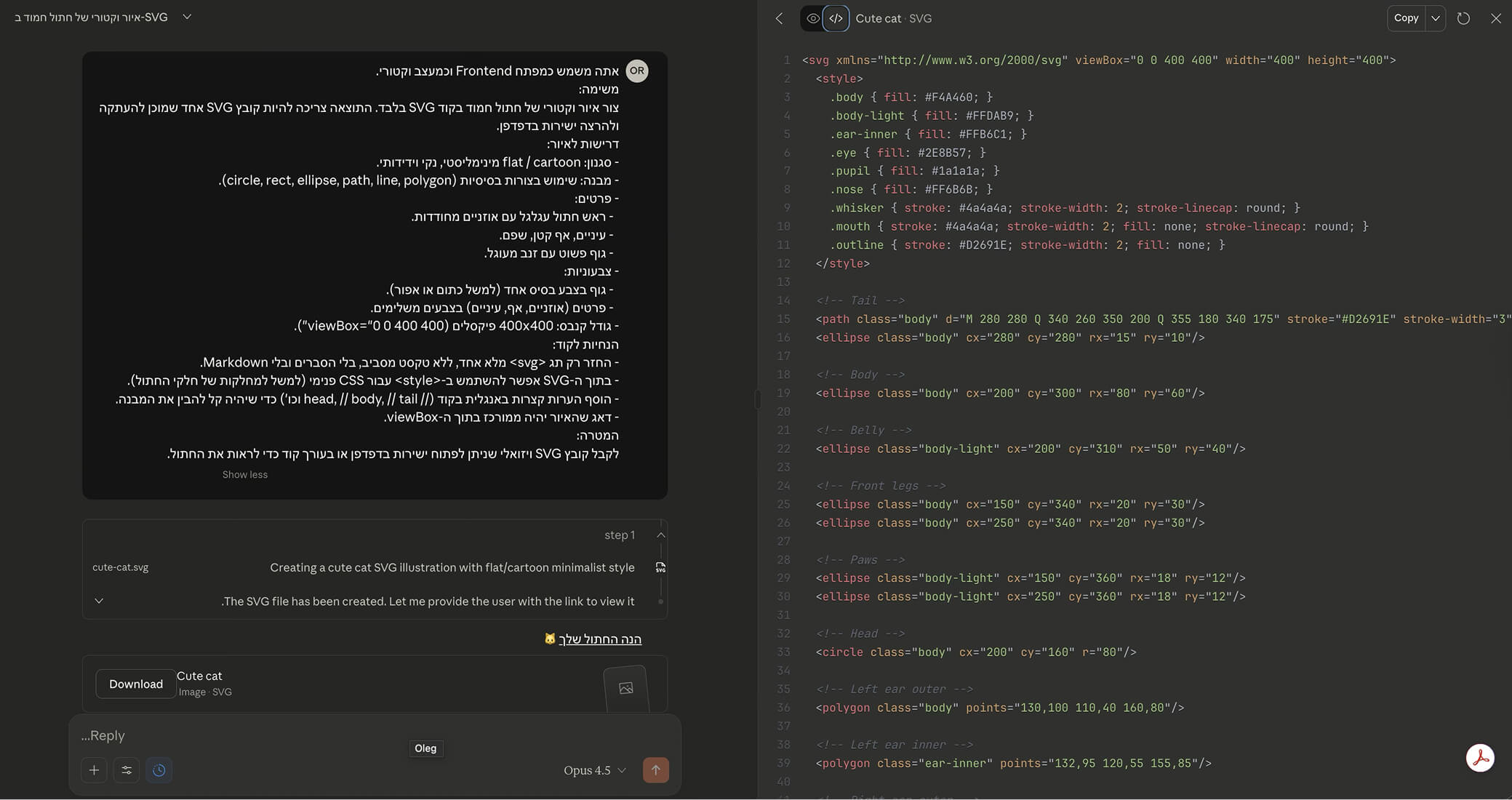
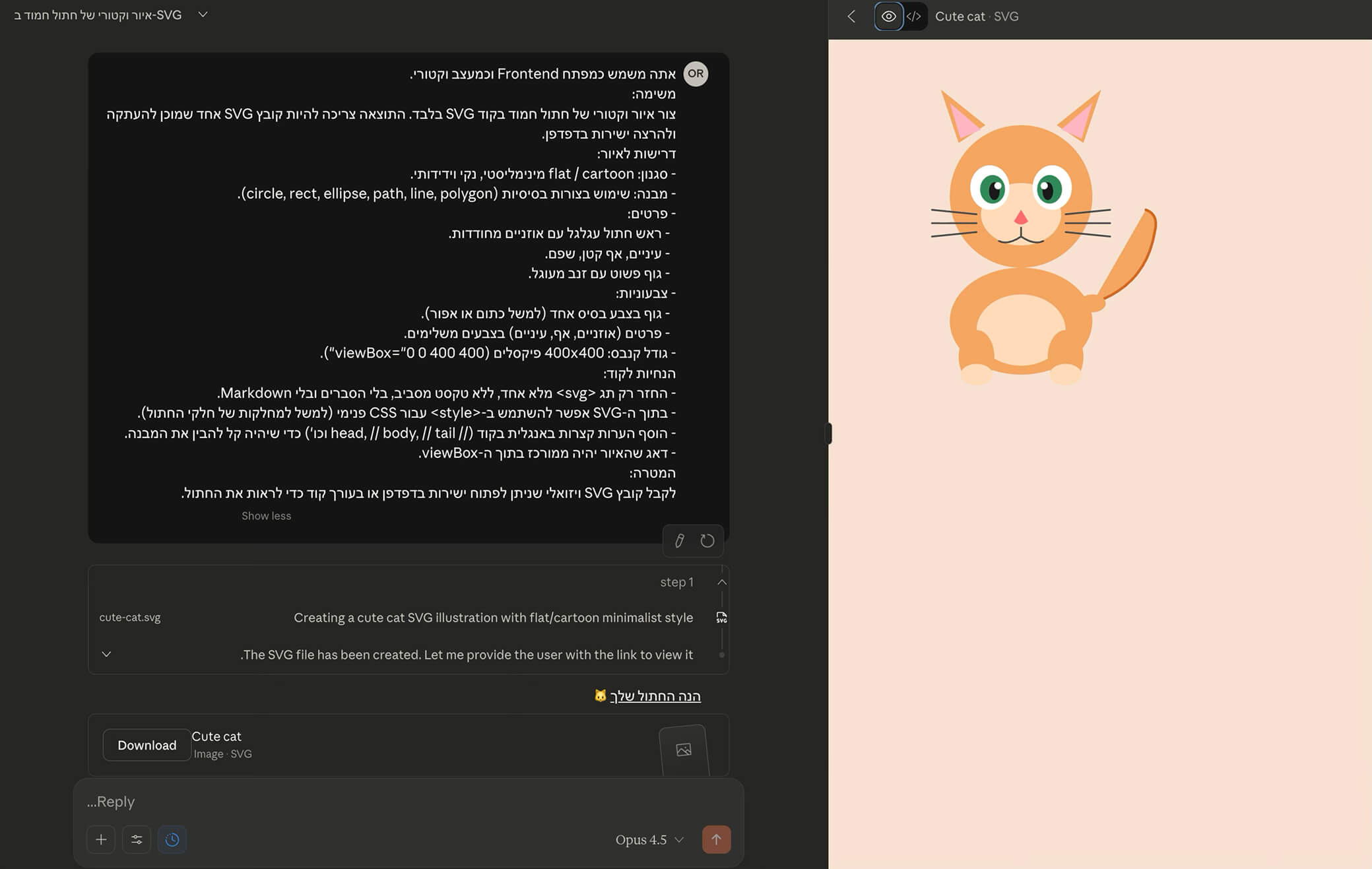
Let's set expectations: Claude is not Midjourney or DALL-E, and it won't generate photorealistic, pixel-based images for you. But make no mistake, it can "draw"; it just does it in the language of developers.
Its graphic capabilities show up in data visualizations, charts, diagrams and interactive elements, all built with code, from SVG and CSS to complex React components or 3D scenes in Three.js. For the demo, we asked it to create a vector version of our cat in SVG code.
Organized work with Projects
One of the familiar pain points of working with language models is having to "re-train" the model in every chat: uploading the spec documents again, reminding it of your tech stack or pasting the brand guidelines once more. Claude's Projects feature solves exactly this headache and boosts productivity. The idea is to create a dedicated workspace for each topic or client, where you can add a knowledge base (Project Knowledge) with code files, documents, design guidelines and any other relevant information.
Once you've created a project and added your materials, every new chat you open inside it automatically "knows" all that context from the very first message, with no need to upload anything again. This lets you stay consistent over time, set custom instructions specific to that project, and quickly switch between your "React developer hat" and your "marketer hat", each with its own toolkit and knowledge ready to go.
.jpeg)
An interface revolution: meet Artifacts
If until now we were used to working with AI models in a linear "ping-pong" format, where we ask and the model replies with a long block of text you have to scroll through, Artifacts changes the rules of the game and turns Claude from a chatbot into a hybrid workspace. The idea is simple but brilliant: separating the "conversation" from the "output".
When Claude detects that you're asking it to produce substantial, standalone content, such as a code snippet, a long document, a React component or a visual diagram, it doesn't "dump" the result into the chat flow; it automatically opens it in a dedicated side panel (Workspace). This change solves the biggest problem of working with code in AI: having to copy and paste into an external editor just to see whether it works. In Artifacts, the code isn't just displayed; it's rendered in real time. If you asked for a Snake game in JavaScript or a React dashboard, you can actually play it or interact with it inside Claude's window, seconds after the code is written.
The real power of this feature is iteration. Since the output lives in a separate window, you can keep chatting with Claude on the side and ask for changes like "make the button blue" or "add another column to the chart", and the artifact updates live before your eyes without losing the context of the conversation. And when you're done? The Publish button lets you generate a public link to your output in a second, effectively turning Claude into a fast deployment tool for prototypes and documents.
Don't start from scratch: the Artifacts Hub
But it doesn't end with the side panel. The Artifacts Hub reveals the "nerve center" of this feature: the central artifacts library. On this screen, found under the Artifacts tab in the main menu, you get smart access to managing your knowledge. On one hand, the Your artifacts tab collects every document, piece of code and design you've ever created, so you'll never have to dig through old chats to find that dashboard you built a month ago. On the other hand, and this is the interesting new addition you can see in the screenshot, there's an Inspiration tab. Here Claude shows a visual gallery of ready-made templates, such as an "advanced writing editor", a "brainstorming idea generator" or a "document converter", letting you "steal" ideas and start working in seconds on top of tools that have already proven themselves, instead of reinventing the wheel every time.
.jpeg)
The Code Terminal: mission control for developers
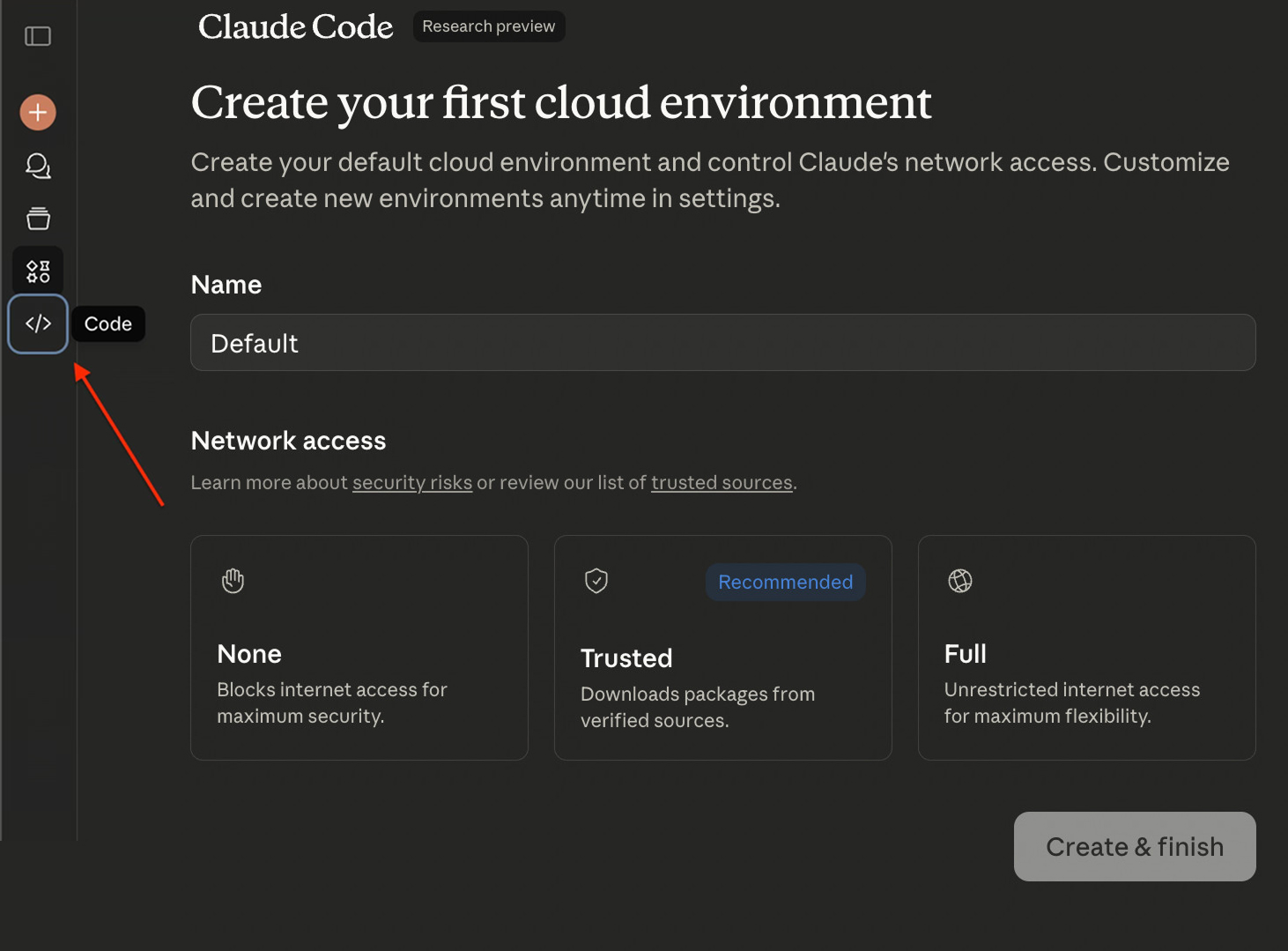
The small < > icon in the sidebar is probably the most important door for developers, because it opens Claude Code, the company's agentic work environment. Unlike the regular chat window, where the model is disconnected and lives in a "bubble" of text, this screen is designed to create a smart link between Claude's brain in the cloud and your actual code. The beauty is that the system lets you choose how to work: if you want to get started quickly and easily, you can set up a "Cloud Environment" with the click of a button. It's a kind of secure, isolated "sandbox" on Anthropic's servers that you connect to your GitHub account, letting Claude work on your code without any local installs at all.
But for developers who want full control and prefer working on their local machine, the system offers an additional, deeper layer through the CLI. In this setup, the process requires a one-time technical setup in the terminal, including authentication that connects Claude directly to the file tree of your local project. The goal in both cases is the same: to let the model understand the full context of the code, not just the single file you copied into it, but the entire architecture, dependencies and logic of the whole project.
Once this connection is set up (whether in the cloud or locally), Claude turns from a passive assistant that generates text into an active pair programmer (Agent). It gains the ability (subject, of course, to your explicit approval) to run terminal commands, edit files and make Git commits in real time. This is a significant shift in mindset: instead of copying and pasting code back and forth, you have another team member sitting with you on the project and carrying out development tasks end to end.
The verdict: pros, cons and everything in between!
To sum up, working with Claude feels like a significant upgrade, especially if you come from a development background. It is shaping up to be an excellent assistant for programmers, not just because it can write code, but because of its interactivity. Being able to ask it to build a web app in React and immediately see it working in the side panel is a game-changer. You can actually click buttons, enter data and run functional tests (QA) in real time inside the interface, which makes writing and fixing code much faster and more convenient.
On the content and language side, the model performs very impressively in languages other than English too (we tested it in Hebrew). The flexibility of its style settings (as we saw with Formal), together with its ability to "dive" into heavy files and pull out the essentials, makes it a powerful research tool. Combined with web search, it offers a complete package. In a head-to-head comparison, some of you may feel it's still a bit less "fluid" than ChatGPT for certain everyday tasks, but its business model (and especially the price of an annual subscription) makes it a very cost-effective alternative.
That said, let's put all the cards on the table: Claude also has clear limitations. If you're looking for an artistic image generator, this isn't it: it doesn't create complex visuals the way Midjourney or DALL-E do. In addition, its main weak spot is the strict limits of the free plan, which run out very quickly. Still, the bottom line is that this is an intelligent, accurate and powerful model that is at least worth giving a chance and trying out.
Disclaimer: blog content is for general information and learning only and is accurate as of its publication date. It is not professional, legal, financial or business advice, nor a recommendation or call to take any action. Any use of this information is at the reader's own risk, and we accept no liability for any resulting loss. Links to external websites and tools are provided for convenience only. We recommend consulting a qualified professional before making decisions.